> ## Documentation Index
> Fetch the complete documentation index at: https://docs.hyperleap.ai/llms.txt
> Use this file to discover all available pages before exploring further.
# Managing Workspaces
> A comprehensive guide to managing workspaces in Hyperleap AI
Workspaces are collaborative environments where teams can work together on Prompts, Personas, Chatbots, Tools, and Assistants. They provide a structured way to organize your work, manage permissions, and maintain consistency across your organization's AI implementations.
## How Workspaces Work
Workspaces provide a collaborative environment for your organization to work efficiently with AI resources. Here's what makes them powerful:
Teams can share and collaborate on Prompts, Personas, Chatbots, Tools, and Assistants efficiently. Experts create reusable resources that the entire team can utilize while maintaining centralized control.
Fine-grained permission management lets you control who can view, edit, and manage Prompts, Personas, Chatbots, Tools, and Assistants. Set role-based access for different team members.
Create and share a library of Prompts, Personas, Chatbots, Tools, and Assistants across your organization. Maintain version control and ensure consistency across teams.
Track and monitor resource utilization, user activity, and performance metrics. Get insights into how your team uses AI resources.
## Prerequisites
To work with Workspaces, you need:
* An account on [Studio](https://studio.hyperleapai.com)
* Admin or Org Owner role for creation
## Creating a Workspace
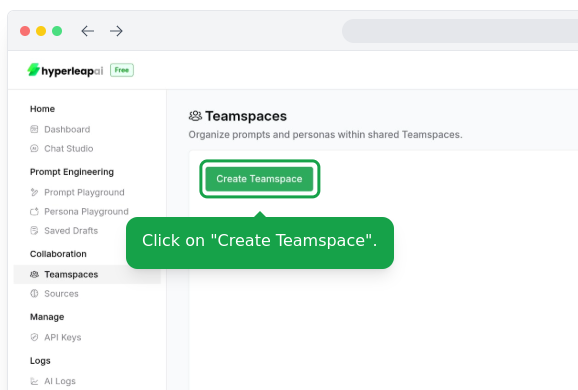
Navigate to **Workspaces** in the API Console and click **Create New Workspace**
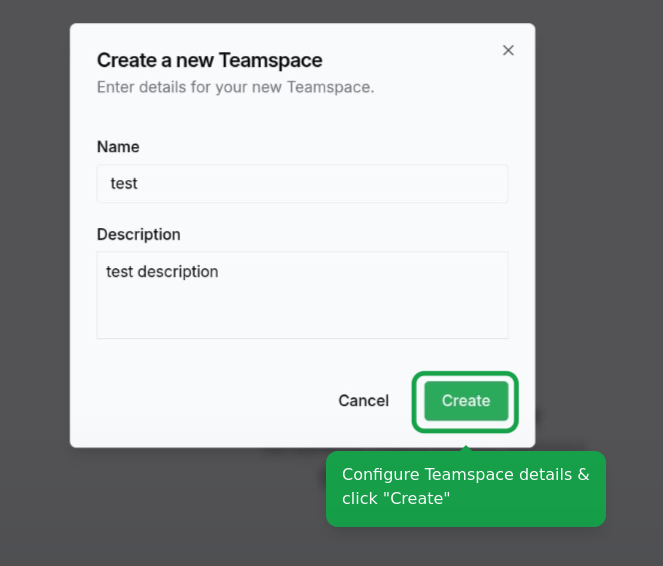
 Configure the details of your workspace:
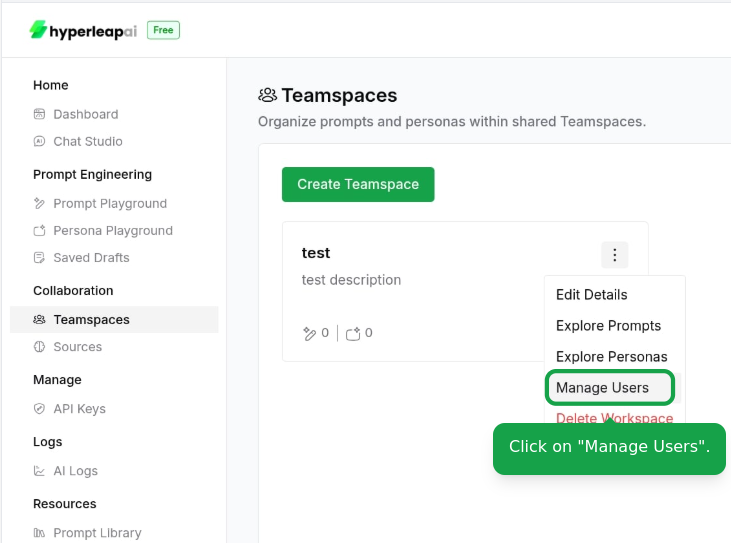
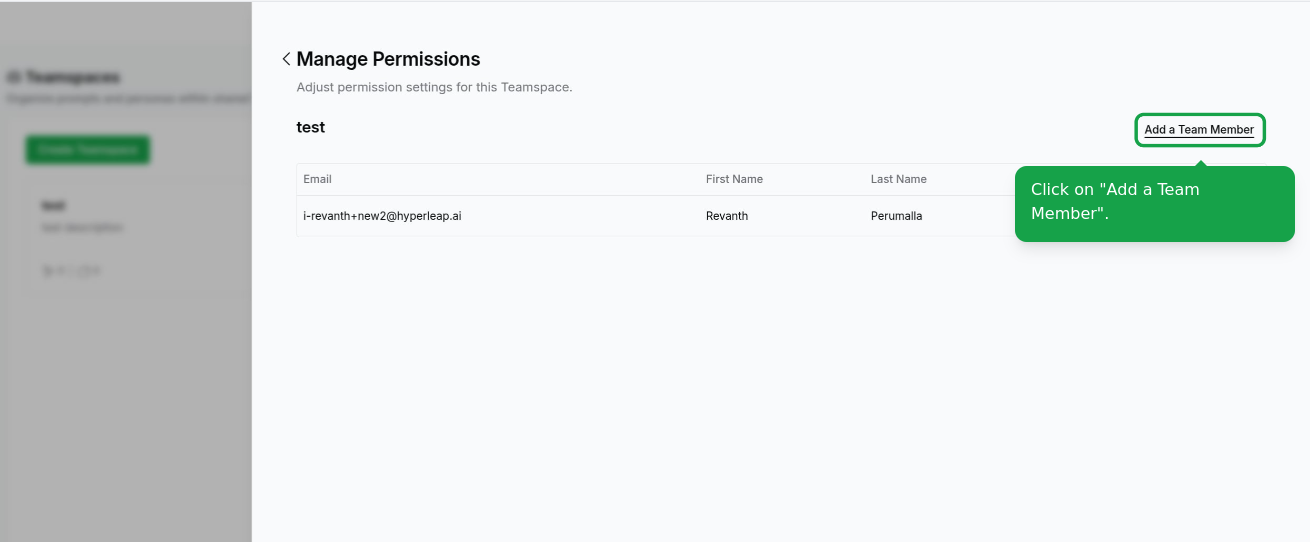
 Invite and manage your team members:
You need to be an admin or owner to invite team members.
Invite and manage your team members:
You need to be an admin or owner to invite team members.
 ## Workspace Roles & Permissions
Workspaces use role-based access control to manage what users can do with resources like Prompts, Personas, and Chatbots. Here are the available roles and their permissions:
**Full Control + Transfer Rights**
* Complete access to all workspace resources
* Can edit, publish, and delete all content
* Can transfer resources to other workspaces or organization
* Can manage workspace settings and members
* Can assign roles to other users
**Use Case**: Workspace creator or primary administrator
**Full Administrative Access**
* Can edit, publish, and delete resources
* Can manage workspace members and permissions
* Cannot transfer resource ownership
**Use Case**: Co-administrators who need full management capabilities
**Edit & Collaborate**
* Can view all workspace resources
* Can edit content (Prompts, Personas, Chatbots)
* Can save drafts and publish changes
* Cannot delete resources or manage permissions
**Use Case**: Team members actively building and refining AI resources
**Read-Only Access**
* Can view all workspace resources and configurations
* Can test and preview Chatbots
* Can view conversation logs and analytics
* Cannot edit, save, or modify any content
**Use Case**: Stakeholders who need visibility without editing rights
**Run-Only Access**
* Can only test/preview Chatbots
* Cannot view resource configurations or settings
* Cannot access detail pages or analytics
**Use Case**: External testers or limited access scenarios
### Permission Examples
| Action | Owner | Admin | Contributor | Reader | Guest |
| ------------------ | ----- | ----- | ----------- | ------ | ----- |
| Test Chatbot | ✓ | ✓ | ✓ | ✓ | ✓ |
| View Configuration | ✓ | ✓ | ✓ | ✓ | ✗ |
| Edit Settings | ✓ | ✓ | ✓ | ✗ | ✗ |
| Save Draft | ✓ | ✓ | ✓ | ✗ | ✗ |
| Publish | ✓ | ✓ | ✓ | ✗ | ✗ |
| Delete | ✓ | ✓ | ✗ | ✗ | ✗ |
| Transfer | ✓ | ✗ | ✗ | ✗ | ✗ |
| Action | Owner | Admin | Contributor | Reader | Guest |
| ------------------ | ----- | ----- | ----------- | ------ | ----- |
| Run Prompt | ✓ | ✓ | ✓ | ✓ | ✓ |
| View Details | ✓ | ✓ | ✓ | ✓ | ✗ |
| Edit/Add Versions | ✓ | ✓ | ✓ | ✗ | ✗ |
| Delete | ✓ | ✓ | ✗ | ✗ | ✗ |
| Manage Permissions | ✓ | ✗ | ✗ | ✗ | ✗ |
| Action | Owner | Admin | Contributor | Reader | Guest |
| ------------------- | ----- | ----- | ----------- | ------ | ----- |
| Chat with Persona | ✓ | ✓ | ✓ | ✓ | ✓ |
| View Configuration | ✓ | ✓ | ✓ | ✓ | ✗ |
| Edit Persona | ✓ | ✓ | ✓ | ✗ | ✗ |
| Delete | ✓ | ✓ | ✗ | ✗ | ✗ |
| Activate/Deactivate | ✓ | ✓ | ✓ | ✗ | ✗ |
| Action | Owner | Admin | Contributor | Reader | Guest |
| ------------------ | ----- | ----- | ----------- | ------ | ----- |
| Run Tool | ✓ | ✓ | ✓ | ✓ | ✓ |
| View Configuration | ✓ | ✓ | ✓ | ✓ | ✗ |
| Edit/Update | ✓ | ✓ | ✓ | ✗ | ✗ |
| Delete | ✓ | ✓ | ✗ | ✗ | ✗ |
| Transfer | ✓ | ✗ | ✗ | ✗ | ✗ |
| Action | Owner | Admin | Contributor | Reader | Guest |
| ------------------- | ----- | ----- | ----------- | ------ | ----- |
| Chat with Assistant | ✓ | ✓ | ✓ | ✓ | ✓ |
| View Configuration | ✓ | ✓ | ✓ | ✓ | ✗ |
| Edit/Update | ✓ | ✓ | ✓ | ✗ | ✗ |
| Delete | ✓ | ✓ | ✗ | ✗ | ✗ |
| Transfer | ✓ | ✗ | ✗ | ✗ | ✗ |
**Organization Admins & Owners** automatically have full access to all workspace resources, bypassing workspace-level role restrictions.
## Troubleshooting
If you're experiencing permission conflicts:
* Verify your role and permissions in the Workspace
* Check if you have the necessary admin rights
* Contact your Workspace admin if issues persist
If you've hit resource limits:
* Review your current usage in the dashboard
* Consider upgrading your plan for higher limits
## Need Help?
* Review our [FAQ](/guides/faq)
* Contact [Support](mailto:support@hyperleap.ai)
## Workspace Roles & Permissions
Workspaces use role-based access control to manage what users can do with resources like Prompts, Personas, and Chatbots. Here are the available roles and their permissions:
**Full Control + Transfer Rights**
* Complete access to all workspace resources
* Can edit, publish, and delete all content
* Can transfer resources to other workspaces or organization
* Can manage workspace settings and members
* Can assign roles to other users
**Use Case**: Workspace creator or primary administrator
**Full Administrative Access**
* Can edit, publish, and delete resources
* Can manage workspace members and permissions
* Cannot transfer resource ownership
**Use Case**: Co-administrators who need full management capabilities
**Edit & Collaborate**
* Can view all workspace resources
* Can edit content (Prompts, Personas, Chatbots)
* Can save drafts and publish changes
* Cannot delete resources or manage permissions
**Use Case**: Team members actively building and refining AI resources
**Read-Only Access**
* Can view all workspace resources and configurations
* Can test and preview Chatbots
* Can view conversation logs and analytics
* Cannot edit, save, or modify any content
**Use Case**: Stakeholders who need visibility without editing rights
**Run-Only Access**
* Can only test/preview Chatbots
* Cannot view resource configurations or settings
* Cannot access detail pages or analytics
**Use Case**: External testers or limited access scenarios
### Permission Examples
| Action | Owner | Admin | Contributor | Reader | Guest |
| ------------------ | ----- | ----- | ----------- | ------ | ----- |
| Test Chatbot | ✓ | ✓ | ✓ | ✓ | ✓ |
| View Configuration | ✓ | ✓ | ✓ | ✓ | ✗ |
| Edit Settings | ✓ | ✓ | ✓ | ✗ | ✗ |
| Save Draft | ✓ | ✓ | ✓ | ✗ | ✗ |
| Publish | ✓ | ✓ | ✓ | ✗ | ✗ |
| Delete | ✓ | ✓ | ✗ | ✗ | ✗ |
| Transfer | ✓ | ✗ | ✗ | ✗ | ✗ |
| Action | Owner | Admin | Contributor | Reader | Guest |
| ------------------ | ----- | ----- | ----------- | ------ | ----- |
| Run Prompt | ✓ | ✓ | ✓ | ✓ | ✓ |
| View Details | ✓ | ✓ | ✓ | ✓ | ✗ |
| Edit/Add Versions | ✓ | ✓ | ✓ | ✗ | ✗ |
| Delete | ✓ | ✓ | ✗ | ✗ | ✗ |
| Manage Permissions | ✓ | ✗ | ✗ | ✗ | ✗ |
| Action | Owner | Admin | Contributor | Reader | Guest |
| ------------------- | ----- | ----- | ----------- | ------ | ----- |
| Chat with Persona | ✓ | ✓ | ✓ | ✓ | ✓ |
| View Configuration | ✓ | ✓ | ✓ | ✓ | ✗ |
| Edit Persona | ✓ | ✓ | ✓ | ✗ | ✗ |
| Delete | ✓ | ✓ | ✗ | ✗ | ✗ |
| Activate/Deactivate | ✓ | ✓ | ✓ | ✗ | ✗ |
| Action | Owner | Admin | Contributor | Reader | Guest |
| ------------------ | ----- | ----- | ----------- | ------ | ----- |
| Run Tool | ✓ | ✓ | ✓ | ✓ | ✓ |
| View Configuration | ✓ | ✓ | ✓ | ✓ | ✗ |
| Edit/Update | ✓ | ✓ | ✓ | ✗ | ✗ |
| Delete | ✓ | ✓ | ✗ | ✗ | ✗ |
| Transfer | ✓ | ✗ | ✗ | ✗ | ✗ |
| Action | Owner | Admin | Contributor | Reader | Guest |
| ------------------- | ----- | ----- | ----------- | ------ | ----- |
| Chat with Assistant | ✓ | ✓ | ✓ | ✓ | ✓ |
| View Configuration | ✓ | ✓ | ✓ | ✓ | ✗ |
| Edit/Update | ✓ | ✓ | ✓ | ✗ | ✗ |
| Delete | ✓ | ✓ | ✗ | ✗ | ✗ |
| Transfer | ✓ | ✗ | ✗ | ✗ | ✗ |
**Organization Admins & Owners** automatically have full access to all workspace resources, bypassing workspace-level role restrictions.
## Troubleshooting
If you're experiencing permission conflicts:
* Verify your role and permissions in the Workspace
* Check if you have the necessary admin rights
* Contact your Workspace admin if issues persist
If you've hit resource limits:
* Review your current usage in the dashboard
* Consider upgrading your plan for higher limits
## Need Help?
* Review our [FAQ](/guides/faq)
* Contact [Support](mailto:support@hyperleap.ai)